Guide · buying
10 things nobody tells you before you buy a digicam
Before you buy an old digicam, check ten things: the card sizes it accepts (many stop at 2 GB or 32 GB), whether its battery code is still easy to replace and a charger is included, which cable the port needs, which model it really is, how fast it shoots, how it copes with light, whether you can see the screen, whether the lens and doors work, and how the eBay listing defines "used". Sensor type matters less than people say. Each point below is tied to a maker document or to reviews our own camera pages already cite. We have not tested units ourselves.
The ten checks at a glance
- CCD or CMOS: Is a CCD camera better than a CMOS one?
- Memory cards: Will my memory card work in it?
- Battery and charger: Does the battery still work, and does it come with a charger?
- USB cable: Which cable does it use, and can I skip it?
- Names: Is this really the camera I am searching for?
- Speed: How slow is an old digicam, really?
- Low light: Will it take good pictures indoors and at night?
- Screen and viewfinder: Can I see the screen in sunlight, and is there a viewfinder?
- Lens and moving parts: What can wear out or break on a camera this old?
- Listing words: What do eBay's condition words and protections cover?
- The date stamp and the box: Smaller surprises: the date stamp, the box and the battery door
1. Is a CCD camera better than a CMOS one?
No. Sensor type on its own does not predict picture quality: sensor size, age and the processing behind it decide more, and the reviews we have read put CCD and CMOS cameras on both sides of the line.
Of the 201 cameras we review, 169 have a CCD and 31 a CMOS sensor. Canon's own museum pages name a CCD for 159 of its 240 digital compacts, a CMOS for 41 and neither for 40.1 That split is why the question comes up so often. The table below takes seven of them and sets the sensor next to what reviewers wrote about noise.
| Camera | Year | Sensor | What the reviewers wrote about noise |
|---|---|---|---|
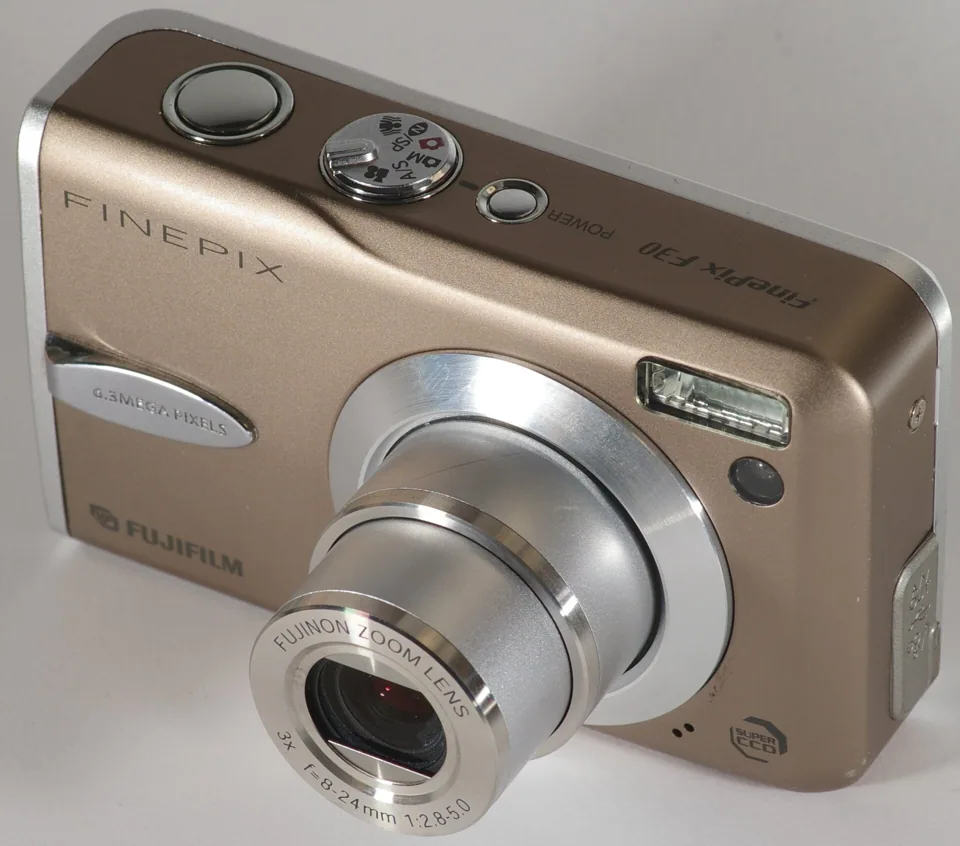
| F30 | 2006 | CCD, 1/1.7", 6.3 MP | DPReview found at least a two-stop advantage over the best conventional CCD compacts of its day.2 |
| PowerShot S95 | 2010 | CCD, 1/1.7", 10 MP | PhotographyBLOG called ISO 80 to 800 its usable range.3 |
| PowerShot S100 | 2011 | CMOS, 1/1.7", 12.1 MP | Same sensor size as the S95. PhotographyBLOG called ISO 80 to 1600 perfectly usable; Canon claimed a quarter of the S95's noise at ISO 1600.4,5 |
| PowerShot ELPH 110 HS | 2012 | CMOS, 1/2.3", 16.1 MP | Reviewers split: Reviewed.com called its low-light performance virtually nonexistent, Cameralabs called ISO 800 a watershed, PhotographyBLOG found ISO 1600 usable.6,7,8 |
| S3300 | 2012 | CCD, 1/2.3", 16 MP | PhotographyBLOG saw noise from ISO 200 upwards; ePHOTOzine rated quality poor at ISO 200 and above.9,10 |
| S3700 | 2015 | CCD, 1/2.3", 20.1 MP | PhotographyBLOG found noise low up to ISO 800; ePHOTOzine found strong noise at ISO 800.11,12 |
| PowerShot ELPH 180 | 2016 | CCD, 1/2.3", 20 MP | Fnac's lab saw smoothing from ISO 400 and called the camera unsuited to low light.13 |
The cleanest pair is the Canon S95 and S100, which share a 1/1.7-inch sensor size; the S95 has the CCD and the S100 the newer CMOS.14,5 The same reviewer put the usable limit at ISO 800 on the S95 and ISO 1600 on the S100.3,4 That is one stop, and it went to the CMOS camera. (Our full comparison is S95 vs S100.)
An old CCD can still beat a newer chip, though. DPReview tested the 2006 F30 and found at least a two-stop advantage over the best conventional CCD compacts, and often three.2 Its sensor was a 1/1.7-inch CCD with only 6.3 megapixels.15 Our reading: a larger sensor with fewer pixels explains more of that result than the letters CCD do.
The newest CCD cameras show the opposite. The 2016 PowerShot ELPH 180 was a 20-megapixel CCD on a 1/2.3-inch chip that sold for $119.99.16 Fnac's lab gave it two stars out of five.13 The S3700 offered a 20-megapixel CCD too, and ePHOTOzine wondered what a sensor that dense was for when 12 or 16 megapixels would give lower noise.12
What to do: read the sensor size and the reviewers' noise limits on the camera's page, and treat "CCD" as a fact about the camera rather than a promise. Our glossary entry explains the two sensor families in plain terms, and the Canon CCD or CMOS list shows every Canon compact with the words Canon used.
2. Will my memory card work in it?
Not always: the size limit is set per camera. A camera made before SDHC may stop at a 2 GB card, an xD camera may stop at 1 GB, and a Sony may want a Memory Stick Duo. Check the maker's own number for your exact model before you buy a card.
The SD Association states that SD host devices can only use SD cards, SDHC hosts can use SD and SDHC, and only SDXC hosts are listed as using SDXC.17 The practical result is that a modern 64 GB card is not a safe guess in a camera from 2006. The table shows what the makers printed for seven cameras we review.
| Camera | Card families | Largest card the maker's document names |
|---|---|---|
| PowerShot SD600 | SD, MMC | Canon's table: SD up to 2 GB; SDHC and SDXC not marked as supported.18 |
| PowerShot SD1000 | SD, SDHC, MMC | Canon's table: SD up to 2 GB; SDHC 4 to 32 GB; SDXC not marked as supported.18 |
| DSC-T10 | Memory Stick Duo, PRO Duo | Sony's 2010 chart: PRO Duo and PRO Duo Mark2 up to 4 GB.19 |
| DSC-W55 | Memory Stick Duo, PRO Duo | Sony's 2010 chart: PRO Duo up to 8 GB; PRO Duo Mark2 up to 32 GB.19 |
| F30 | xD-Picture Card | The manual lists xD cards up to 1 GB.20 |
| F31fd | xD-Picture Card | The manual lists xD cards up to 2 GB.21 |
| LX3 | SD, SDHC, MMC | The manual lists SD 8 MB to 2 GB and SDHC 4 to 32 GB, and no SDXC.22 |
Two details catch people. First, the C875 takes SD and MMC cards but not SDHC, according to DPReview.23 Second, a camera can gain support later: Imaging Resource reported in March 2007 that Casio firmware added support for SDHC cards of 8 GB or more on some of its cameras, which means an old unit may need an update before a large card works.24 We found no maker statement that a card larger than the one in a camera's row will work in it.25
Also ask whether a card is included. Imaging Resource noted that no card came in the F30's box and that it has only 10 MB of built-in memory, which holds a handful of pictures.26
What to do: type the model into the card lookup, which shows the maker's words and a link to the source for each row. The format pages cover SD, SDHC and SDXC, xD and Memory Stick, and card errors are on their own page.
3. Does the battery still work, and does it come with a charger?
Assume the battery is tired and ask what is in the box. Lithium-ion packs lose capacity as they age even when they sit unused, and a replacement needs the exact code printed on the old one.
Battery University estimates that a cobalt-based lithium-ion cell stored at 40 percent charge keeps about 96 percent of its capacity after a year at 25 C, while one stored full keeps about 80 percent. It adds that heat makes the loss worse and that not all lithium-ion systems behave the same.27 A camera pack that spent a decade in a drawer is outside those figures, which is the point: we cannot tell you how worn any given pack is. We have not tested units.
Start-of-life numbers show why a worn pack hurts. Imaging Resource rated the Fujifilm F30's NP-95 at about 580 shots when new,26 but the Canon S95 at about 200.28 Shots per charge are measured by the CIPA test, explained in the glossary. By our arithmetic, a pack at half strength turns 200 shots into roughly 100, which is an afternoon.
The charger deserves its own question. DPReview wrote that the Canon G7 X's charger takes about 150 minutes for a full charge, so the listing should say it is included.29 Some cameras charge over USB instead: T3 noted that the Sony HX20V's battery charges in the camera from a USB lead,30 and Reviewed.com said the same of the Nikon AW120.31
AA cameras sidestep the problem. Canon rates the A640 at about 500 shots on NiMH cells against about 280 on alkaline,32 and Imaging Resource lists the Nikon L810 at about 300 shots on alkaline, 450 on NiMH and 740 on lithium AAs.33 Both run on ordinary AA cells.
A shared code makes a spare easier to find. By our count the NP-BG1 appears in 11 of our live Sony reviews (Cyber-shot DSC-W300, Cyber-shot DSC-W100, Cyber-shot DSC-W120, Cyber-shot DSC-W170, Cyber-shot DSC-T100 and others), and the NB-4L in 11 Canon reviews. That is a count of battery codes on the maker's spec pages, not a statement about third-party packs, which we have not checked.34
What to do: write down the code before you bid, ask whether a charger or USB cable is included, and budget for a fresh battery. Canon codes are tabulated at Canon battery codes.
4. Which cable does it use, and can I skip it?
Often a maker-specific cable, so check the code before you buy one. If the camera takes a common card, a card reader removes the problem: pull the card and copy the files.
Our cable guide lists 708 cameras that name a cable code on their own row. Canon's guides name one cable, the IFC-400PCU, for well over a hundred compacts, Nikon used several UC-E codes, and Olympus used numbered CB-USB cables.35 Nikon's support site lists different port types for different Coolpix models, so a plain mini-USB lead is not automatically right.36 For Sony and Fujifilm the picture is thinner: the cable guide records that Sony's manuals before 2009 print no code and that Fujifilm's manuals give the USB cable no code.35
Transfer speed is a second reason to prefer a reader on the oldest models. DPReview noted that the 2002 Coolpix 2500 connects by USB 1.1, which is slow by later standards, and that a card reader is the easy way to copy pictures.37
What to do: open the cable guide for your brand (Canon, Nikon, Sony) and note the code; when a code is marked unconfirmed, trust a card reader over a guess. Whole story: Digicam cables explained.
5. Is this really the camera I am searching for?
Probably yes, under another name. Canon sold one camera as a PowerShot ELPH in the US, a Digital IXUS in Europe and an IXY in Japan, and the same body can appear under all three in listings.
Canon's museum lists the PowerShot SD1000 as the Digital IXUS 70 and the IXY Digital 10 in other regions,38 and the ELPH 180 as the IXUS 175 and the IXY 180.39 Search all three names. Our decoder maps them for the models in Canon's museum.40
The opposite trap is the look-alike with a different name. Canon's museum and DPReview separate the A640 from the A630 and the older A620;32,41 Cameralabs notes the L810 replaced the L120, so a listing for the older Nikon is not the newer model.42 The ELPH 180 and the 2017 ELPH 185 share dimensions, weight, a 20-megapixel CCD and an 8x lens in Canon's specifications, yet they are different models.39,43
What to do: compare the model number on the camera's front or base plate with the listing title, not the photo alone.
6. How slow is an old digicam, really?
Slower than most people expect, and reviewers disagree on how much: start-up ran from about one to 3.5 seconds on the cameras we read about, and shutter lag with autofocus ran around half a second. Half-pressing the button first cuts the lag to a few hundredths of a second.
The F100fd shows how far reviewers can sit apart. Imaging Resource measured 3.5 seconds from power-on to first shot and 3.27 seconds between large JPEGs,44 while PhotographyBLOG put start-up at about a second.45 Two honest measurements, one camera. The S95 looked sluggish to Imaging Resource, with a wide-angle shutter lag of 0.64 seconds and about 2.6 seconds per shot,28 yet the 2005 SD500 felt instant to Macworld, which found shutter lag virtually nonexistent.46
Lag depends on focus. Imaging Resource measured the PowerShot SD1300 IS at 0.53 seconds at wide angle with full autofocus but 0.073 seconds prefocused.47 The budget superzoom is where speed hurts most: Cameralabs timed the L810's start-up at about three seconds, and Expert Reviews said about 30 percent of its full-zoom shots came out slightly soft and another 30 percent completely out of focus.42,48
What to do: half-press, wait for the beep, then press fully. If you shoot moving children or pets, read the speed section of the review for the exact model.
7. Will it take good pictures indoors and at night?
Mostly with the flash, or at the lowest ISO. Reviews of several cheap 2010s compacts report noise or smoothing from ISO 200 to 400, while a few designs, such as the F30 and S95, were noted for dim light in their year.
The sensor table in the first section carries most of the evidence. Add three more points. DPReview said the Canon SD870 IS suffered above ISO 400 from noise and noise reduction.49 On the S3300, PhotographyBLOG reported that the top ISO 3200 setting cuts the picture to 5 megapixels.9 And megapixels do not rescue detail: Expert Reviews found the 18-megapixel HX20V's noise reduction glossed over textures such as grass and hair,50 and Cameralabs found the 10-megapixel FX35 showed little extra detail against the 6-megapixel F30.51
What to do: look for sample photos at ISO 400 and above on the review page for the model, and plan on flash indoors. Our review pages use real files with the sensitivity read from each photo.
8. Can I see the screen in sunlight, and is there a viewfinder?
Often not well. Many compacts dropped the optical viewfinder, and reviewers repeatedly called their screens hard to read in direct sun. Where a viewfinder exists it may be small or show only part of the frame.
DPReview found the F30's screen hard to read in direct sun and the camera has no viewfinder.2 The same outlet called the A640's screen dim and hard to read in direct sun, while PhotographyBLOG found it bright and clear.41,52 That pattern repeats: Neocamera called the F100fd's screen superb outdoors, and PhotographyBLOG warned it can be hard to see in bright sunshine.53,45
A viewfinder is not a guaranteed fix. Imaging Resource found the A640's optical finder showed only about 80 percent of the frame at wide angle.54 For the PowerShot SD1200 IS, PhotographyBLOG called the finder small and murky and expected most owners to ignore it, while The Register found it useful outdoors.55,56
What to do: if you shoot outdoors, prefer a camera whose reviews mention a usable viewfinder or a bright screen, and ask the seller to confirm the screen has no dead patches.
9. What can wear out or break on a camera this old?
The lens barrel, its cover, the battery and card doors, and any rubber seals. Ask for photos with the lens extended and the doors open, and do not assume a waterproof camera is still waterproof.
Reviewers describe the moving parts. The F30's barrel comes out in two segments and a cover snaps open at power-up.57 The L810 will not extend its lens with a lens cap on, and warns you if it is on at start-up.42 The Panasonic LX5 has a separate lens cap with no automatic cover, so it is easily lost.58 Photo Review found the Sony T90's sliding cover did not fit tightly enough to keep out dust and grit.59
Seals are the part we can say least about. Imaging Resource advised shaking water off the Olympus 720 SW before opening its doors,60 and DigitalCameraReview pointed to rubber O-rings on the 710's battery and USB doors.61 Those were observations from 2006. We found no source on how a 2006 seal behaves today, so treat any old unit as splash-resistant until you have tested it yourself.
Doors can interact too: on the A640 the card slot shares the battery door, and DPReview noted the card cannot be changed while the camera is on a tripod.41
What to do: check the pictures in the listing for a clean lens barrel and closed doors, and ask the seller to confirm the lens extends and retracts fully.
10. What do eBay's condition words and protections cover?
eBay defines its condition words precisely. "Used" means the item functions as intended; "For parts or not working" means it does not. In our reading, a listing that says "untested" under "Used" conflicts with eBay's definition, and payment outside eBay checkout is not covered by the Money Back Guarantee.
eBay's category help page defines "Used" as an item that may show cosmetic wear but is fully operational and functions as intended. It defines "For parts or not working" as an item that does not function as intended, including items that need service or repair or lack essential components. It tells buyers to read the seller's listing for details.62 Reading that text, our view is that "untested" is the seller telling you they do not know, and the condition field then has to be the one for parts.
The Money Back Guarantee covers items not received and items not as described, which eBay says includes items that arrive broken, damaged or faulty. It applies when you pay through eBay checkout, and a return request is allowed up to 30 calendar days after delivery, or longer if the seller's returns window is longer. Items paid for partly or fully outside eBay are not covered.63
Two further habits follow from those words. Insist on photos of the actual camera, powered on, with the battery that is being sold. And message the seller with the one thing you are unsure about (card, charger, screen) so the answer exists in writing before you pay. This section is guidance from eBay's published rules, not legal advice. We have no data on how often scams happen with these cameras and do not claim any.
Smaller surprises: the date stamp, the box and the battery door
The date stamp is permanent on the pictures that carry it, the box may hold less than you expect, and settings vary by model.
Canon's support page for a family of ELPH, A-series and SX cameras says a Date Stamp cannot be deleted from the image once it is recorded and that its font, colour and position cannot be changed. The camera also saves the date in each file as Exif data, so you can print it without stamping the picture.64 That page covers specific models (it names the ELPH 100 HS and ELPH 300 HS), so another model may differ; read your own manual.
On what is in the box: the L810 shipped with four non-rechargeable AA cells,65 and the F30 shipped without a card.26 If a listing says "boxed", ask for a photo of the contents.
The checklist to take to the listing
| Check | Ask or look for | More |
|---|---|---|
| Sensor | What size is the sensor, and what do reviewers say about ISO 400 and up? | Why |
| Card | Which card families and largest size does the maker name? Is a card included? | Why |
| Battery | What is the battery code, is a charger or USB cable included, and how old is the pack? | Why |
| Cable | Which cable code does the port use, or can I use a card reader? | Why |
| Name | Does the model number on the body match the listing title? | Why |
| Speed | Do the reviews of this exact model mention start-up and lag? | Why |
| Light | Are there real sample photos at ISO 400 and above? | Why |
| Screen | Does the screen show cleanly, and is there a usable viewfinder? | Why |
| Parts | Does the lens extend and retract fully? Are doors and seals intact? | Why |
| Listing | Is the condition field consistent with the description, and is payment through eBay checkout? | Why |
What we do not know
- How worn the battery is on any particular used camera. We have measured nothing ourselves.
- Whether a 15-year-old waterproof seal still holds. The sources we found describe 2006 behaviour only.
- Used prices. We print none: eBay's licence rules out price models, so the sold listings are the place to look.
- How common scams are with these cameras. We found no data and make no claim.
- Which third-party batteries and chargers fit which camera. We did not check, and compatibility lists on shop sites are not evidence.
- Cable pin counts for Sony, Fujifilm and Panasonic. The cable guide marks these unconfirmed.
Looking for one?
- A used digicam: Recently sold on eBay Live eBay listings
- Card reader: SD card reader USB on Amazon
- Rechargeable AA batteries: rechargeable AA batteries and charger on Amazon
Affiliate links: we may earn a commission. As an Amazon Associate I earn from qualifying purchases. We print no used-camera prices; the sold listings show what these actually fetch.
Related: digicam glossary · card lookup · cable lookup · Canon name decoder · comparisons · all reviewed cameras · which digicam for which vibe
Sources
- Digicam Atlas: Which Canon PowerShot cameras have a CCD sensor? (from the Canon Camera Museum pages)
- DPReview, Fujifilm FinePix F30 review by Simon Joinson (25 Jul 2006)
- PhotographyBLOG, Canon PowerShot S95 review, conclusion (1 Sep 2010)
- PhotographyBLOG, Canon PowerShot S100 review (24 Nov 2011)
- Canon Camera Museum, PowerShot S100
- Reviewed.com, Canon PowerShot ELPH 110 HS review
- Cameralabs, Canon PowerShot ELPH 110 HS / IXUS 125 HS review
- PhotographyBLOG, Canon IXUS 125 HS review
- PhotographyBLOG, Nikon Coolpix S3300 review (7 Dec 2012)
- ePHOTOzine, Nikon Coolpix S3300 review by Daniel Bell (15 May 2012)
- PhotographyBLOG, Nikon Coolpix S3700 review
- ePHOTOzine, Nikon Coolpix S3700 review
- Fnac (L'Eclaireur), lab test of the Canon IXUS 175
- Canon Camera Museum, PowerShot S95
- DPReview, Fujifilm FinePix F30 announcement (14 Feb 2006)
- Imaging Resource, Canon PowerShot ELPH 180 first look
- SD Association, SD, SDHC, SDXC and SDUC card capacity choices
- Canon Asia, What SDHC/SDXC memory cards are compatible with this camera? (page dated 22 Aug 2013)
- Sony, Memory Stick compatibility chart, Digital Still Camera (last updated 3 September 2010)
- Fujifilm FinePix F30 manual (card list)
- Fujifilm FinePix F31fd manual (card list)
- Panasonic DMC-LX3 operating instructions (card list)
- DPReview, Kodak EasyShare C875 review
- Imaging Resource, Casio firmware adds SDHC support of 8GB or greater for some cameras (March 2007)
- Digicam Atlas: Which memory card does my digicam take? (lookup of maker-stated limits, each row sourced)
- Imaging Resource, Fujifilm F30 review by Dan Havlik (updated 19 Aug 2006)
- Battery University, BU-808: How to Prolong Lithium-based Batteries
- Imaging Resource, Canon S95 review by Shawn Barnett and Zig Weidelich (1 Oct 2010)
- DPReview, Canon PowerShot G7 X review
- T3, Sony HX20V review (10 Sep 2012)
- Reviewed.com, Nikon Coolpix AW120 review
- Canon Camera Museum, PowerShot A640
- Imaging Resource, Nikon Coolpix L810 specifications
- Digicam Atlas: Canon battery codes (from the Canon Camera Museum pages)
- Digicam Atlas: Digicam cables explained (708 cameras with a cable code on their own row, each sourced)
- Nikon support, USB cable and port types for Coolpix cameras (article 000045149)
- DPReview, Nikon Coolpix 2500 review (2002)
- Canon Camera Museum, IXY Digital 10 / PowerShot SD1000 / Digital IXUS 70
- Canon Camera Museum, PowerShot ELPH 180 / IXUS 175 / IXY 180
- Digicam Atlas: Canon ELPH vs IXUS vs IXY decoder
- DPReview, Canon PowerShot A640 review
- Cameralabs, Nikon Coolpix L810 review by Ken McMahon (11 Oct 2012)
- Canon Camera Museum, PowerShot ELPH 185 / IXUS 185
- Imaging Resource, Fujifilm F100fd review (24 Jun 2008)
- PhotographyBLOG, Fujifilm FinePix F100fd review
- Macworld, Canon PowerShot SD500 review (25 May 2005)
- Imaging Resource, Canon SD1300 IS review (2010)
- Expert Reviews, Nikon Coolpix L810 review by Ben Pitt (9 May 2012)
- DPReview, Canon SD870 IS concise review (2007)
- Expert Reviews, Sony Cyber-shot DSC-HX20V review (30 May 2012)
- Cameralabs, Panasonic Lumix DMC-FX35 / FX36 review
- PhotographyBLOG, Canon PowerShot A640 review
- Neocamera, Fujifilm F100fd review, usability
- Imaging Resource, Canon PowerShot A640 review
- PhotographyBLOG, Canon Digital IXUS 95 IS review
- The Register, Canon Digital IXUS 95 IS review (12 Jun 2009)
- Reviewed.com, Fujifilm FinePix F30 review
- PhotographyBLOG, Panasonic Lumix DMC-LX5 review
- Photo Review (Australia), Sony Cyber-shot DSC-T90 review
- Imaging Resource, Olympus Stylus 720 SW review
- DigitalCameraReview, Olympus Stylus 710 review (2006; Wayback Machine copy)
- eBay Help, Item condition by category (Used; For parts or not working)
- eBay Help, eBay Money Back Guarantee
- Canon support, Inserting the Date into Images (Date Stamp); page lists ELPH 100 HS, ELPH 300 HS, A800, A1200, A2200, A3200 IS and SX220 HS
- PhotographyBLOG, Nikon Coolpix L810 review (7 Aug 2012)