Nikon Coolpix P · on sale September 2005
The Nikon Coolpix P2: a $399.95 compact with Wi-Fi built in
Sold under one name, the Coolpix P2, in the sources we read. Its 8-megapixel twin was the Coolpix P1.
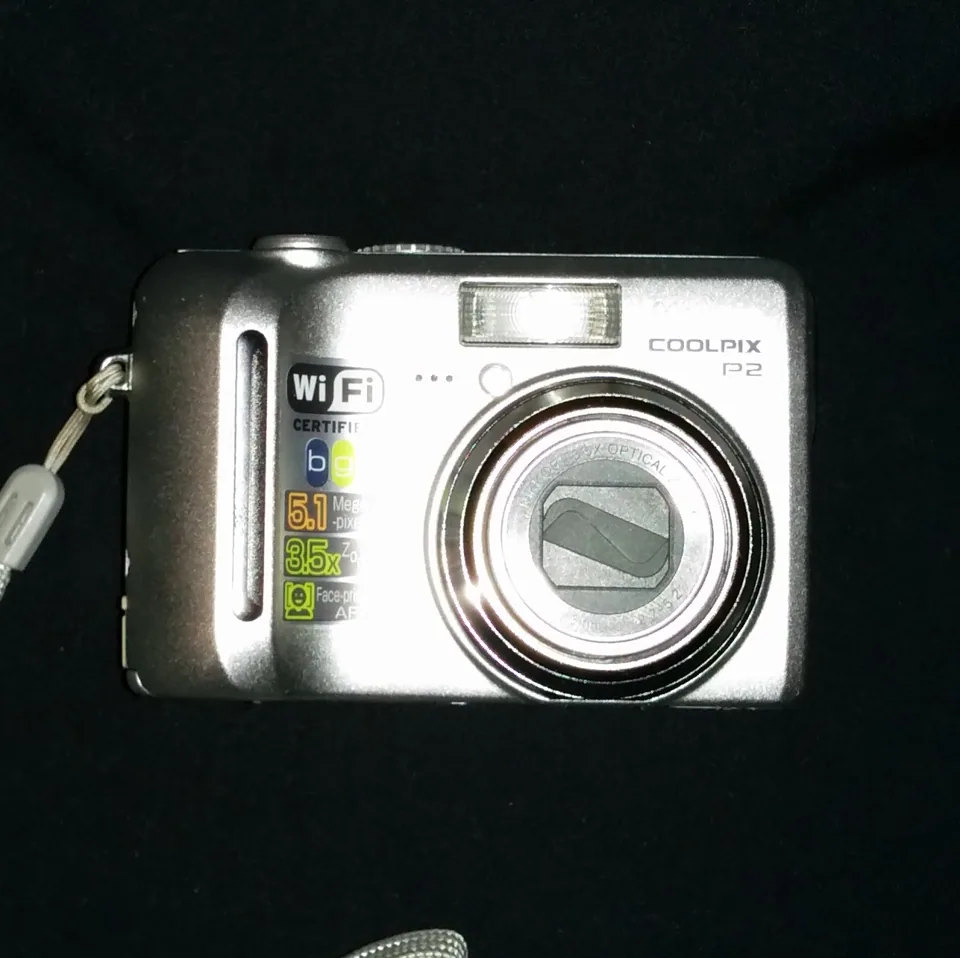

In September 2005 Nikon launched a 5.1-megapixel compact with a radio inside it. Five contemporary reviews found it easy to use and four liked its pictures; the radio is where they split.
- Launched
- September 2005
- Sensor
- 5.1 MP CCD
- Lens
- 36–126 mm, 3.5×
- Card
- SD
- Battery
- EN-EL8
Nikon Coolpix P2 specs: sensor, lens, battery, memory card and cable
The Nikon Coolpix P2 came out in September 2005 at $399.95 as a 5.1 MP CCD compact with a 36–126 mm (35 mm equivalent) 3.5× zoom lens. It takes SD cards and runs on the EN-EL8 battery. Sources
Meet the camera
Pocket-lint called the P2 "a tad underwhelming to look at", a plain-lined body beside the style-driven ultra-compacts of the day.7 Imaging Resource described a camera slightly taller than a credit card and just about as wide, a little under an inch and a half thick, weighing 189 grams with battery and card; Nikon gives 91 by 60 by 39 millimetres and 170 grams without them.42 Whether that was pocketable depended on who held it. Imaging Resource called it designed for shirt pockets and small purses, while Macworld found it, at 1.5 inches thick, a little too chunky for a pocket.48 Both judged the build solid: Macworld said well built and robust, Imaging Resource called the body rugged metal, and WiFi Planet thought only the mode dial somewhat delicate.846
Nikon Inc. announced the P2 and the P1 on 1 September 2005 as, in its words, "the world's first digital cameras with built-in Wi-Fi capabilities". The P2's suggested price was $399.95, with sales from September; a wireless printer adapter, the PD-10, followed in October at $49.95.1 Imaging Resource's launch report said the cameras would ship in mid-September.1 In the UK the P2 was announced at £279.99 for the end of the month.3
Why this one was interesting
A radio that stopped at your own computer
Imaging Resource's launch report called the wireless LAN the big hook that set the P1 and P2 apart in a crowded market.1 The P2 sends pictures only to Nikon's PictureProject software, either straight to a computer or through a wireless router, with a range of up to 30 metres depending on conditions; Nikon's release ties wireless printing to a PictBridge printer to the optional PD-10 adapter.421 Imaging Resource's review called this far less ambitious than Kodak's EasyShare One, which could reach Kodak's web gallery, but noted that the P2's radio is built in and speaks 802.11g where Kodak's spoke b.4 At the launch Imaging Resource was told that wireless use costs only about 20 per cent of battery life; in the review's own test a fresh battery was drained in a little over an hour of play, with the radio on about half the time.14
A large sensor, kept at five megapixels
TechRadar's reviewer liked the physically large 1/1.8-inch sensor and credited it with excellent noise performance.9 Anyone who wanted more pixels could buy the P1, which Pocket-lint called otherwise identical;7 TechRadar put it at about £55 more and Imaging Resource at about $60 to $70 more at retail.94 Imaging Resource also listed the other differences: 32 MB of built-in memory and a lowest sensitivity of ISO 50 on the P1, against 16 MB and ISO 64 on the P2.4
Scene modes with a help button
Nikon listed 16 scene modes, 11 of them with three effects each (Normal, Effect 1 and Effect 2).3 A tap of the Help button explains what each effect does, and Pocket-lint singled the help system out as a plus.47 Exposure control stopped short of full manual. Nikon's UK release lists aperture-priority with ten steps of aperture control, and Macworld and Imaging Resource both noted that there is no shutter priority.384
What was lost
Nikon dropped the optical viewfinder to fit a 2.5-inch screen. WiFi Planet would have liked both, so the screen could stay dark to save battery;6 Pocket-lint and Imaging Resource listed the omission among their cons.74 The screen has 110,000 pixels, a figure given by both Macworld and Imaging Resource.81 There is no stabilisation for stills: Imaging Resource's specification box says none, and the electronic vibration reduction works only when filming.14 Its reviewer leaned instead on the Best Shot Selector, which takes up to ten shots and keeps the least blurred, and said it worked well.4
Wireless is a separate position on the mode dial that behaves as full auto, which Imaging Resource disliked, wanting the exposure controls there too.4 No card comes in the box, as Imaging Resource and Pocket-lint both noted, and the built-in memory holds only about five Fine pictures by Nikon's count, five at full size in Imaging Resource's test.472
The dark: its weak point
The reviewers disagreed about noise. TechRadar called the noise performance excellent.9 Pocket-lint found intrusive noise in shadows even at ISO 100 with noise reduction switched on, and called it the one image-quality downside.7 Imaging Resource saw low to moderate noise at the lower sensitivities, moderately high at ISO 200 and more at ISO 400, yet said ISO 400 prints at 8 by 10 inches, a little soft and noisy, looked better than average and would probably do for wall or table display.4
Imaging Resource's low-light chart came out bright at all four sensitivities down to about a quarter of a foot-candle (2.7 lux). Below that ISO 64 and 100 darkened sharply, while ISO 200 and 400 still showed the target, and ISO 400 looked arguably usable.4 Autofocus worked unaided a little above that level, and well beyond it with the assist lamp.4 The longest exposure the camera allows is 8 seconds.4 The flash is the weaker partner: Imaging Resource's test at its closest range, 8 feet, did not quite light the target, needed 1.7 stops of exposure compensation indoors, and took about 6 seconds to recycle after a full-power shot.4 The photographs below were taken with real P2s; the settings come from each file's EXIF data, and the camera tops out at ISO 400.








Real photographs taken with this camera, credited under each picture. The first is an 8-second night exposure at ISO 200; three of the four are by the same photographer, who uploaded most of the P2 pictures on Commons (see below).
Like the sound of it? See recent eBay sold listings for this camera ↗
On eBay right now
Live listings for this camera, supplied by eBay and updated automatically. We earn a commission if you buy through them.
The little wins
Shoot & Transfer
Each picture goes to the computer as it is taken, and PictureProject can build a slide show that grows while you shoot.4 Imaging Resource saw a one-megapixel picture arrive about 5 seconds after the shutter on a mixed b and g network, and full-size pictures at roughly 8 seconds each on a g-only network; Pocket-lint called it ideal for a party.47
D-Lighting, hidden in plain sight
This playback option saves a copy of a picture with the shadows lifted, a kind of fill flash after the fact. Imaging Resource found it subtle and warned that it makes noise in the lifted areas more visible, and that Nikon had buried it: you hold down the centre button of the multi-selector.4 Pocket-lint and TechRadar both praised it.79
Face AF
In Portrait (Face AF) the camera finds a face and focuses on it; Imaging Resource said the mode suits waist-up portraits of up to three people.4 Pocket-lint watched a face icon follow the subject around the screen.7
Red-eye fixed on the way to the card
After the flash, software in the camera hunts for red eyes and removes them before the file is saved; Imaging Resource said it did so very well, and TechRadar said it worked brilliantly.49 The price is time: Imaging Resource put the wait between shots in that mode at 6 to 7 seconds.4
How it drew the picture
In Imaging Resource's lab, strong detail ran to about 1,100 lines per picture height, with extinction near 1,450; the pictures looked slightly soft overall despite in-camera sharpening, with noise suppression smoothing fine detail such as hair. The corners were good, the colour pretty good though often slightly dark, the hues close to accurate, and barrel distortion measured 0.74 per cent at the wide end and almost none at the long end. Prints held up: usable at 11 by 14 inches and sharp at 8 by 10.4 Macworld, by contrast, found the pictures reasonably sharp and the colour acceptable if a little dark, but not that good beside other cameras at a similar price.8 Pocket-lint called the results exemplary, crisp and colourful;7 WiFi Planet's test pictures were generally sharp and properly exposed;6 TechRadar found the lens sharp in all its tests and the metering good in tricky light.9 Pocket-lint, Macworld and Imaging Resource each said the pictures ran a little dark; WiFi Planet and TechRadar found the exposure right.78469
The nine photographs below, mostly outdoors, run from 7.5 mm (36 mm equivalent) at the wide end to 26.3 mm (126 mm) at the long end, the focal length being each file's EXIF value.2 Commons held 6,880 files from this camera when we checked. In two random draws of 200 of them (our own sampling), 156 and 164 files (78 and 82 per cent) came from one uploader, credited on the files as Joe Mabel, and 175 and 182 (88 and 91 per cent) were shot at ISO 64, so the pool shows one photographer's habits more than the camera's range.11 None of the nine below is by that uploader.


















Photos taken with this camera, from Wikimedia Commons, credited under each picture.
Where it let you down
The Wi-Fi is where the reviewers lost most time. Imaging Resource's network normally ran WPA encryption, which the P2 does not support, so it dropped to WEP, then found the camera wanted keys of exactly 5 or 13 characters and would not take the older 40-bit kind.4 Two of the reviewers lost time to firewalls: Imaging Resource named UDP port 5353 and TCP port 15740 as deal breakers, and WiFi Planet's camera only connected after a Nikon product manager pointed out a manual footnote about those settings.46 WiFi Planet's connection also failed from a deck about 30 feet from the router, through walls, and Pocket-lint called the set-up a fiddle, though transfer was surprisingly fast once it worked.67 Macworld called the set-up utility simple but noted that it has to be run again for each new network, since the camera cannot join one on its own.8
Speed was mixed. Imaging Resource clocked 3.6 seconds from power-on to the first shot, which it called slow, 2.32 seconds between large Fine JPEGs, a shutter lag of 0.52 second at wide and 0.64 second at telephoto with full autofocus, and 0.089 second prefocused.4 Continuous shooting ran at 2.2 frames a second for five frames,4 and a USB download ran at 461 KB a second, which Imaging Resource called slow by current standards.4 Nikon rates the battery at about 190 shots; Macworld got 201 in its battery test (run with the PC World Test Center) and rated battery life flawed.28 Imaging Resource called it somewhat short, especially with Wi-Fi in use, and advised buying a second battery.4
What the reviewers said
| Outlet | Date | Verdict |
|---|---|---|
| WiFi Planet | 14 Oct 2005 | Looked at the P2 mainly as a Wi-Fi device and found it a success on the whole, despite temporary set-up problems; pictures generally sharp and properly exposed; wanted an optical viewfinder as well.6 |
| Pocket-lint | 13 Nov 2005 | 4.0 out of 5. For: good metering, good autofocus and exposure control, many shooting features, the Help system. Against: no optical viewfinder, no card supplied, Wi-Fi connection problems.7 |
| Imaging Resource | 1 Feb 2006 | Image quality and resolution first-rate; a "Dave's Pick" for image quality, styling and features;54 the Wi-Fi adds to the price and is not as painless as it might be. Better than average high-ISO results and corner sharpness; flash range limited.4 |
| Macworld | 4 May 2006 | Image quality rated good, battery life flawed. Advice: the unexceptional image quality and limited battery life fail to justify the price.8 |
| TechRadar | page prints 12 Dec 2006 (original date unconfirmed) | Stunning image quality and excellent lens sharpness, built-in Wi-Fi; only complaint that five megapixels may feel limiting; great performance and value. No score appears on the page we read.9 |
Where the sources disagree
- Price. Nikon Inc. gave $399.95 and WiFi Planet $400; Imaging Resource's review lists $349.95 "at introduction". We use Nikon's figure.164
- Built-in memory. Nikon lists about 16 MB. Imaging Resource's feature list says about 32 MB (the P1's figure, our reading), while its storage page says 13.5 MB.24
- Flash range. Nikon's circular letter gives 0.5 to 3.8 m at wide; the specification box on Imaging Resource's launch page gives 2.6 m, and its test found the target not fully lit at 8 feet, which it said matched Nikon's figure of a little over eight feet.214
- Aperture and shutter control. WiFi Planet said you can set either; Nikon's sheet lists an aperture-priority mode and no shutter-priority mode, and Macworld and Imaging Resource say there is no shutter priority.6284
The timeline
- 1 September 2005Nikon Inc. announces the P1 and P2; the P2's suggested price is $399.95.1
- Mid-September 2005The US shipping date given in Imaging Resource's launch report; the UK date is the end of the month.13
- 14 October to 13 November 2005WiFi Planet and Pocket-lint publish their reviews; Pocket-lint scores it 4.0 out of 5.67
- 1 February 2006Imaging Resource's review date; its news item announcing the review follows on 6 February.45
- 4 May 2006Macworld says the price is not justified.8
Should you buy one now?
Buy one if you want a small, easy five-megapixel Nikon whose pictures four of five contemporary reviewers liked, you will treat the Wi-Fi as a curiosity, and you are content to compose on a 2.5-inch screen.67498 It launched at $399.95;1 what it sells for now is a question for the sold listings. Before you bid, check these:
- The battery. It takes the EN-EL8 Li-ion, and Nikon's figure is about 190 shots.2 Replacements are on Amazon ↗.
- The card. Nikon's sheet lists SD memory cards, and no card was in the box.24 Our sources do not discuss SDHC or larger cards, so check before buying a high-capacity one; see our memory card guide.
- The cable. Nikon Japan's quick start guide lists a UC-E6 USB cable among the box contents;10 see our UC-E6 cable page. Imaging Resource used USB to load Wi-Fi profiles into the camera.4
- The Wi-Fi. Imaging Resource found WPA unsupported and WEP the only way in.4 Modern routers default to newer encryption (our reading), so the radio may be unusable unless you can run an old-style network. Nikon's sheet lists PictureProject for Windows 98SE to XP and Mac OS X 10.1.5 or later;2 we have not tried it on a current computer.
- The controls. WiFi Planet thought the mode dial somewhat delicate, so check that it clicks firmly through every position, and that the shutter-like lens cover on the front opens and closes.64
If you are wondering why cameras like this are being hunted down again, we tell that story once, in Pictures that never left the card; for the vocabulary, see our glossary. For an earlier five-megapixel Coolpix without the radio, see our Coolpix 5200 (2004).12
See recent sold prices on eBay ↗Shop on eBay ↗EN-EL8 batteries ↗
Sources
- Imaging Resource, Nikon announces two P-series digicams by Mike Tomkins (1 Sep 2005), with the Nikon Inc. press release of the same day: MSRP $399.95, available September 2005
- Nikon Corporation, circular letter 'COOLPIX P1/P2 Specifications' (September 2005; copy hosted by Techgage)
- PhotographyBLOG, Nikon Coolpix P1 and Nikon Coolpix P2 Announced (2 Sep 2005), including the Nikon UK press release and UK prices
- Imaging Resource, Nikon Coolpix P2 review with lab tests by Mike Pasini and Dave Etchells (review date 1 Feb 2006; news item 6 Feb 2006)
- Imaging Resource, Review posted for Nikon Coolpix P2 by Dave Etchells (news item, 6 Feb 2006)
- WiFi Planet, Nikon CoolPix P2 by Gerry Blackwell (14 Oct 2005; page later updated)
- Pocket-lint, Nikon Coolpix P2 digital camera by Doug Harman (13 Nov 2005; score 4.0 out of 5)
- Macworld, Nikon Coolpix P2 camera by Richard Baguley (4 May 2006; tested with the PC World Test Center)
- TechRadar, Nikon Coolpix P2 review, signed Matthew Richards (the page prints 'Published 12 December 2006' under a 'tech.co.uk staff' byline; we could not confirm the original publication date)
- Nikon Japan, COOLPIX P1/P2 quick start guide (Japanese PDF; the box contents list the USB cable UC-E6)
- Wikimedia Commons, Category: Taken with Nikon Coolpix P2 (6,880 files when we checked on 27 Oct 2026)
- Digicam Atlas, our own Nikon Coolpix 5200 retrospective (its data file cites the reviews listed there)
The camera photograph is by Linedwell (CC BY-SA 4.0); sample photographs are credited under each one, all via Wikimedia Commons. Links to eBay and Amazon are affiliate links.